
How to take your brick-and-mortar store online without doubling your workload
At night, your customers search online while your door is locked. From behind the counter, though, selling online looks like a second business to run. Here's how to connect your store and your online shop so they work together: one inventory, in-store pickup, your current customers ordering online, and a clear order to get started.
Taking your brick-and-mortar store online doesn't mean starting a second business. The principle is simple: one platform for your register and your site, one shared inventory, in-store pickup to start, and a small selection of products instead of the whole catalog at once. Your physical store isn't a handicap here. It's your biggest head start.
This isn't a leap you have to make all at once. It's a mountain that looks steep from the bottom, but you climb it one step at a time, and you don't have to climb it alone.
What happens after you close
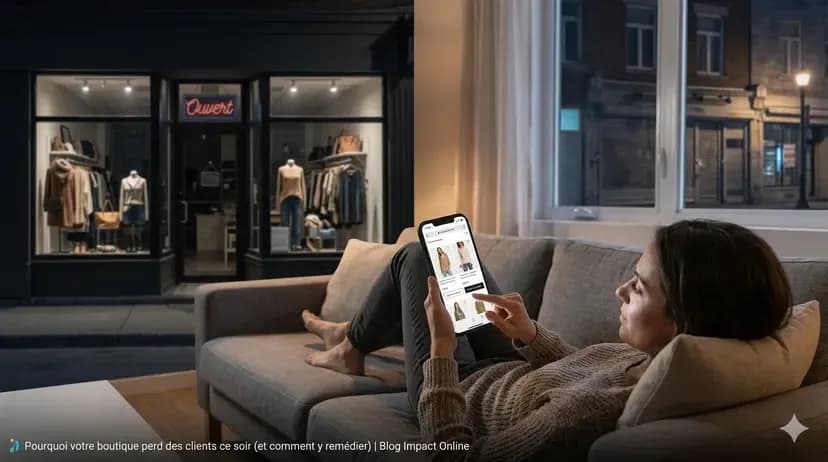
Picture it. It's 9:30 on a Thursday night. A shopper is looking for a pair of boots on her phone, settled on the couch. She thinks of your store: she stopped by last week and liked what she saw. She types your name. She finds an address, maybe your hours, but no products and no way to order. A few results down, another merchant shows her exactly the boots she wants, with delivery or pickup the next day.
You didn't do anything wrong. Your store was closed, like every night. The difference is that the other merchant had left a door open online.
Your physical store is an advantage, not a handicap
You often hear that online shopping will replace physical stores. The numbers say otherwise. In Canada, for example, e-commerce made up 6.8% of retail trade in May 2026, according to Statistics Canada. Most buying still happens somewhere other than an online cart. The web is used for more than buying, though: it's used to decide. Before making the trip, a shopper checks whether you carry the product, when you open, what your store looks like.
Someone starting from scratch online has to build everything: products, suppliers, customers, a reputation, a way to handle returns. You already have at least four things an online-only shop doesn't:
- Customers who know you. They trust you, they know what you sell, and plenty of them would be happy to order on a Tuesday night without making the trip.
- Real inventory and established suppliers. You don't have to guess what to sell: you know what flies off the shelves and what sits there.
- A pickup point. Your store is both a warehouse and a service counter, which solves a big part of the shipping headache for local customers.
- Credibility. An address, a storefront, people who've met you in person: that reassures a shopper who's hesitant to type in their card number.
Why taking your store online feels so steep
When a merchant thinks about selling online, they see everything at once: picking a platform, photographing every product, writing every listing, keeping inventory in sync between the store and the site, packing and shipping orders, answering emails, getting found on Google, all while still serving customers at the counter. Seen that way, it's an impossible climb.
Most people expect they have to put everything online before opening. In reality, nothing says you have to start at the top. An online store can start small, with a few products and in-store pickup, then grow at the pace your customers ask for. So the real challenge isn't becoming an online retailer overnight. It's connecting the two without doubling the work.
Pick a platform that connects your store and your online shop
The most important decision isn't the design or the domain name. It's choosing a system where your store and your online shop share the same foundation: the same products, the same inventory, the same customer records. If you have to enter every sale by hand in two systems, you'll double your workload, and sooner or later you'll sell something online that's no longer on the shelf.
That's why I work with Shopify. It combines an online store with a point-of-sale app, Shopify POS (your register), that runs on a tablet or a phone. A sale at the counter updates your online inventory, and a web order updates your in-store inventory. There's a more personal reason too: my job is your product listings, your search rankings and your logistics, not getting up at 3 a.m. to restart servers.
Attached to your current register? That's not necessarily a dealbreaker. Many POS systems connect to Shopify through a sync app. Just know that every bridge between two pieces of software is one more place where something can come loose. Whatever you choose, check at least these five things:
- Inventory is shared in real time between the store and the site.
- In-store pickup is offered to the customer at checkout.
- Sales tax is calculated automatically based on the customer's address.
- The shop can run fully in your customers' language, and in more than one if needed.
- A customer who buys at the counter and online has one record, not two.
One inventory for your brick-and-mortar store and your site
Syncing is the heart of it. It won't fix inventory that's wrong, though: it just copies the mistakes faster. Here's the order to tackle it in.
- Do a real starting count. Before connecting anything, make sure the quantities in your system match what's actually on your shelves and in your back room.
- Give every item a unique code. That's called a SKU: a code that identifies one specific product in one specific size and color. A blue sweater in medium and the same one in large each get their own. If your products already have barcodes, even better, your register can scan them.
- Pick one source of truth. Every delivery, every damaged item and every adjustment gets recorded in the same place. The day someone fixes a quantity "just on the site," syncing stops meaning anything.
- Keep a safety buffer on risky items. A one-of-a-kind piece handled all day in the store can be gone before the web order is packed. For those, show a slightly lower quantity online, or keep them in-store only.
- Decide who packs web orders, and when. For example, one person goes through orders at opening and mid-afternoon. A clear routine keeps online orders from landing at the bottom of the pile.
In-store pickup: your best selling point
For a local customer, in-store pickup answers almost every objection to buying online. They order at 10 p.m., they know the product is really in stock, they pay no shipping and they pick it up the next day. For you, there's no box to pack, and the customer comes back into your store, where they may well spot something else they like.
In Shopify, pickup is turned on in your shipping settings, for each location where you want to offer it. A few settings make all the difference:
- A realistic preparation time. Better to announce "ready next business day" and pleasantly surprise the customer than to promise an hour and keep them waiting at the counter.
- A notification when the order is ready. The customer gets an email or a text, which saves you the "is it ready yet?" calls.
- A labeled shelf behind the counter. Pickup orders get their own spot, with the name and order number clearly visible, so any employee can hand them over.
- Clear instructions. Where to go, what to bring, and how long the order will be held.
How to turn in-store customers into online shoppers
Your best future online customers have already walked into your store. The problem is that most of them don't know you sell online yet. Nobody's going to guess: you have to tell them, simply and often.
- Say it in one sentence at the register. "We've got an online store now, you can order and pick up here." A small sign with a QR code by the register does the rest.
- Offer email receipts. It's convenient for the customer, and it's a chance to ask if they'd like to hear about new arrivals. Ask for permission clearly: in Canada, the US, the UK and the EU, the law sets rules on consent or opt-out for commercial email.
- Put your online store's address everywhere your customers look. On bags, business cards, receipts, the front door.
- Update your Google Business Profile. When someone searches "shoe store near me," it answers for you. Current hours, recent photos and a link to your online store: an incomplete profile loses a customer before they've even seen your products.
- Start with what your regulars already ask for. The items people ask you to set aside, the ones they come back for every month, the last-minute gifts: those should go online first.
For the Google side, from your Business Profile to how your pages rank, that's what Google ecosystem support covers.
Sales tax on online orders: what changes and what doesn't
Good news first: an online sale is still a sale. If you already collect sales tax at the counter, you keep doing so online. What changes is shipping outside your area, because the rules often depend on where the product is delivered.
In Canada, for example, you charge the tax of the province where the product is delivered. The Canada Revenue Agency gives the example of a Vancouver store shipping to Toronto and charging Ontario's HST. In the United States, states set their own rules for sellers based elsewhere, and in the UK and the EU, VAT has its own rules for distance selling. A customer who orders online and picks up in your store, on the other hand, pays the same tax as at the counter.
The right platform does the math for you: Shopify calculates sales tax based on the customer's address and shows it to the buyer at checkout. You still need to set up your tax registrations correctly from the start. I'm not an accountant, and this is a general overview: for your specific situation, your accountant is the right person to ask, especially once you start shipping a lot outside your region or your country.
Three common mistakes when getting started
- Waiting until everything is perfect. An online store that waits to be complete never opens. A well-made first version with a handful of products teaches you more than months of preparation.
- Running two inventories. Entering sales by hand in two systems doubles the work, and sooner or later you'll promise online an item that already sold at the counter.
- Copying the store instead of translating it. What works at the counter, the advice, the smile, being able to touch the product, has to be expressed differently online: good photos, descriptions that answer questions, clear shipping and return policies. The most common mistakes on Shopify product pages will save you a few detours.
Where to start: five steps to sell online without closing the store
- Pick a small selection of products: your best sellers, the ones your regulars ask for and that are easy to describe. A smaller, well-presented catalog beats a complete one that's half filled in.
- Set up the platform and the shared inventory: starting count, codes, one source of truth.
- Turn on in-store pickup. It's often the first way your local customers will try your online store.
- Update your Google Business Profile, with a link to your online store.
- Tell your current customers: at the register, on your bags, in your newsletter, on social media. Then add products as you go.
Why you don't have to climb alone
You can do everything above yourself: Shopify is built for it. For most merchants, the real mountain shows up when it's time to put the inventory online. Every product needs a listing: a title, a description, photos, sizes and colors, a price, the words your customers type into Google. Multiply that by a few hundred items, add the store design and the marketing so people find it, all while running the store, and it's easy to see why so many projects end up in a drawer.
That's why I work with independent merchants on everything that leads to a sale, with one point of contact from start to finish. I also built a tool that automates online store creation. It's like baking cookies with a cookie cutter: the first one takes the longest, because you have to make the cutter, but the rest go much faster. The heavy lifting is done once, in the tool, which lets me make this kind of support accessible to a neighborhood shop and frees up time for what really matters: understanding your business, your customers and your products. To see what getting started includes, take a look at support for setting up your online store.
Frequently asked questions
Do I need to put all my products online from day one?
No. Start with a well-presented selection: your best sellers, or the products people call to ask about. Add the rest once you see what sells online.
Do I have to ship everywhere right away?
No. In-store pickup and local delivery are good first steps: they keep logistics simple and bring customers back into your store. Shipping farther can come later, and each option is set up separately in your shipping settings.
Can I keep my current POS system?
Often, yes: many POS systems connect to Shopify through a sync app. One system for both the store and the online shop is still the simplest way to avoid inventory mismatches.
Will an online store empty out my physical store?
Its main job is to get you found when the door is closed. A shopper who sees your products online at night may well come in to buy them the next day. Done well, it works for the store, not against it.
The store stays, you add another door
Plenty of merchants said "cash only" before cards became the normal way to pay. Selling online is the same kind of shift: it doesn't replace your brick-and-mortar store, it adds a way to be found and to serve your customers when the door is closed.
If you'd like to see where to start for your business, fill out the form or message me privately. We'll look at your situation together, no jargon and no hard sell.